Social media is not one task.
It is a chain of connected responsibilities that begins long before anyone clicks “Publish.”
Someone needs to understand the business, decide what is worth sharing, create a content plan, write the captions, design the graphics, produce short-form videos, schedule the posts, monitor engagement, and prepare appropriate responses.
For a small business owner, that can feel like several part-time jobs combined into one. For an agency, it becomes a production workflow that must be repeated across multiple clients. For an internal marketing team, it often means moving information manually between documents, design tools, approval threads, and scheduling platforms.
Most social media tools help with one part of that chain.
We wanted to build a system that could manage the workflow as a whole.
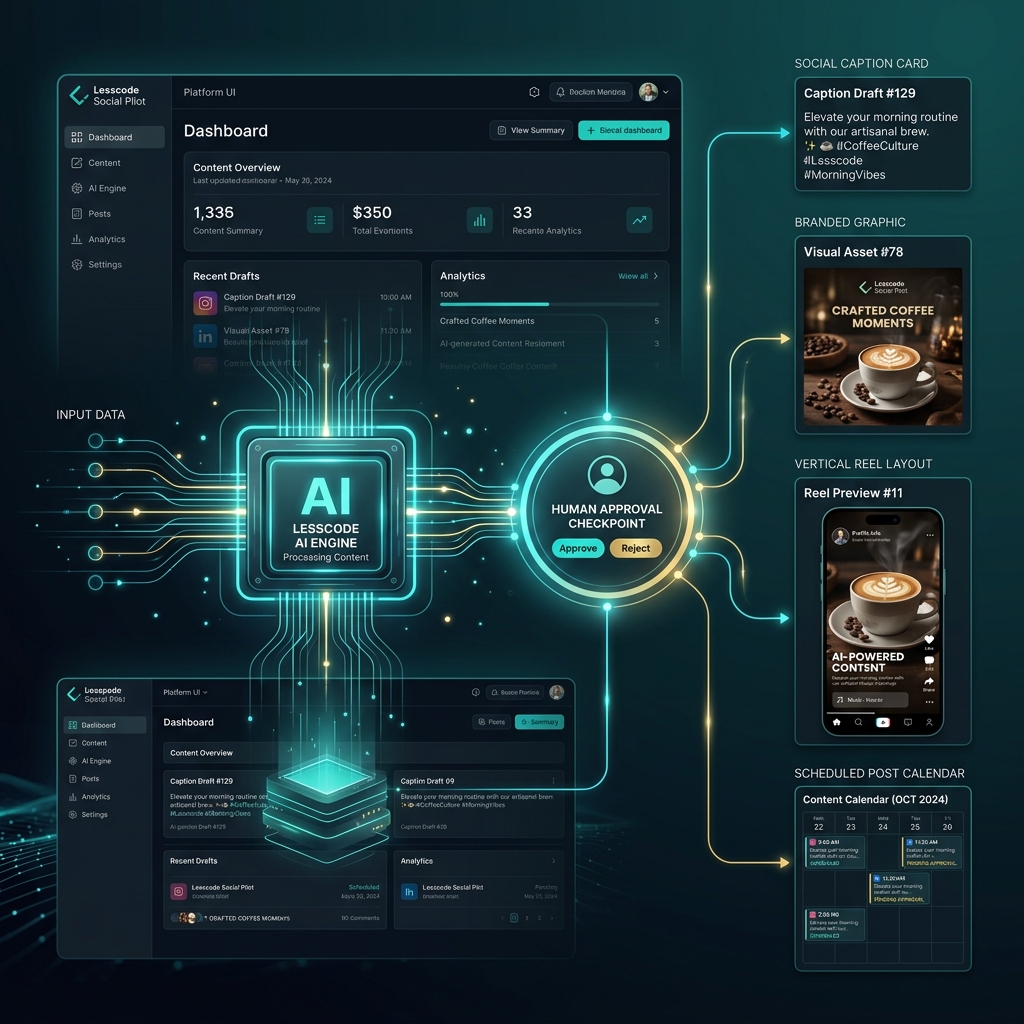
That system is Lesscode Social Pilot, our newly launched AI social media automation platform. Lesscode’s main website lists the product as live and describes it as an autonomous AI social media engine.
Its purpose is not simply to write captions or place finished posts on a calendar. It is designed to move from business knowledge to content strategy, creative production, approval, scheduling, publishing, and engagement support in one connected workflow.
Most Social Media Automation Still Requires Manual Work
A typical social media workflow may involve one AI tool for writing, a separate design platform for graphics, another application for video editing, a scheduling tool for publishing, and a shared inbox for comments and mentions.
Each tool may work well on its own. The problem appears in the handoffs.
A caption has to be copied into the design brief. A graphic has to be downloaded and uploaded somewhere else. A video needs to be exported in the right format. The final content then needs to be matched to the correct account, date, campaign, and call to action.
Approval may happen through email, chat messages, spreadsheets, or screenshots. Any change to the caption can create a mismatch with the graphic. A promotional post may accidentally use an expired offer. A location-specific campaign may be published with the wrong phone number.
Scheduling was never the whole problem. The harder problem was creating accurate, relevant, branded content consistently.
Lesscode already approaches social media as a combination of strategy, content calendars, production, scheduling, and publishing—not as isolated tasks. Social Pilot turns that operational approach into a software platform.
Why We Built the Platform
Consistent social media activity requires a mix of skills that many businesses do not have available internally.
A complete content operation may involve:
- A strategist deciding what to publish
- A copywriter developing the message
- A designer producing branded visuals
- A video editor preparing short-form content
- A social media manager scheduling and monitoring posts
Small businesses may not be ready to hire all those roles. Founders are often too busy delivering the actual service. Agencies face a different problem: the same production process must be repeated across many clients, each with a different brand, audience, service list, location, and approval process.
Generic AI tools can accelerate parts of the work, but they usually begin with a blank prompt.
That means the user must repeatedly explain the business, provide the right background information, define the desired tone, list the prohibited claims, describe the campaign, and check whether the output is accurate.
Without enough context, AI-generated content can invent services, promotions, statistics, locations, guarantees, or customer outcomes. It may produce polished writing that does not accurately represent the company.
We started with a different principle:
The business itself—not a blank prompt—should become the source of the content.
The platform therefore begins by building useful business context. Once that context exists, it can support content planning, writing, creative production, approval, and publishing without requiring the user to explain the company from the beginning every time.
How the AI Social Media Automation Platform Works
The complete workflow can be represented simply:
Website → Business Knowledge → Content Plan → Copy and Creative → Approval → Publishing → Engagement
Step 1: It learns about the business
The process begins with the company’s existing website and any additional information supplied for the campaign.
The objective is not merely to summarize the homepage. The system is designed to identify and organize useful business information, such as:
- Services and products
- Industries served
- Business locations
- Brand positioning
- Frequently asked questions
- Contact information
- Calls to action
- Approved offers and claims
- Portfolio items, testimonials, or business updates when supplied
This information becomes structured business context that can be referenced throughout the content workflow.
A pet-grooming company, for example, might offer mobile grooming, breed-specific treatments, nail trimming, de-shedding, and puppy introductions. Those details matter. A generic caption about “premium pet care” is less useful than a post accurately explaining a real service and directing customers to the correct booking page.
Step 2: It creates grounded content
Creating attractive content is relatively easy. Creating attractive content that remains faithful to the business is much harder.
Social Pilot is designed to generate posts using the business knowledge available to the campaign rather than making unsupported assumptions.
Grounding does not mean inaccurate output becomes impossible. AI-generated material should still be reviewed where accuracy, compliance, or brand sensitivity matters. The purpose of grounding and verification is to reduce unsupported claims and give the generation process a more reliable source of truth.
Restricted claims, prohibited topics, required wording, and campaign-specific instructions can also help define what the system should and should not produce.
Step 3: It develops a content strategy
A useful social media presence needs variety.
Publishing a continuous stream of promotional posts can quickly become repetitive. Producing random educational tips without a business objective is not much better.
The platform can organize a campaign around a balanced mix of topics, including:
- Educational content
- Service or product highlights
- Frequently asked questions
- Brand-awareness posts
- Promotional content
- Seasonal topics
- Customer problems and solutions
- Portfolio or project highlights
- Testimonials when provided
- Engagement-focused posts
Campaign goals, publishing frequency, preferred tone, available services, and business priorities can guide this plan.
The result is intended to behave more like a content calendar than a list of unrelated AI ideas.
Step 4: It writes social media posts
Once a topic is selected, the platform develops the written post.
That may include a clear hook, concise supporting copy, an appropriate call to action, platform-aware formatting, and relevant hashtags where they add value.
The business knowledge base remains central to this stage. If the post highlights a service, the copy should reflect the service the business actually offers. If it promotes an appointment, it should use an approved booking action. If it references a location, it should use the correct location information.
The goal is not to fill a calendar with generic motivational statements. Each post should have a reason to exist within the campaign.
Step 5: It generates branded social graphics
The creative workflow connects the visual directly to the post topic.
The platform can generate complete social media graphics using the campaign’s visual instructions, brand colors, industry context, and supplied visual references. Creative directions can vary by campaign so that an educational post does not look identical to a promotional offer or a service announcement.
The launch scope includes social feed graphics and story-oriented creative production, with text integrated into the design where appropriate. Social Pilot supports square feed templates (1080x1080) and portrait stories (1080x1920).
Businesses can also supply reusable visual references, design preferences, or avatars that help guide the creative output.
Step 6: It produces short-form video content
Short-form video requires more than resizing a static graphic.
A video workflow may involve selecting a topic, preparing a short script, planning scenes, creating visual assets, adding text overlays, configuring audio where applicable, and rendering the result in a vertical format.
Social Pilot connects those production stages to the same campaign knowledge used for static posts. This helps keep the message aligned with the business instead of treating the video as a separate creative project. The platform generates 9:16 vertical video clips complete with subtitles and custom brand colors.
Step 7: It supports approval and automation
Not every business wants the same level of automation.
A regulated business may need to review every post. An agency may need client approval. A small local company may prefer to approve the first campaign and allow future approved content to follow a defined schedule.
The platform is designed around:
Autonomous execution with optional human approval.
Content can be reviewed before publishing, approved individually, scheduled after approval, or processed according to the automation settings configured for the campaign.
This approach follows the same principle Lesscode uses in other content-automation work: AI can accelerate production while human review gates remain available where control is required.
Step 8: It schedules and publishes content
Creation and publishing are connected inside the same workflow.
Once content is ready and any required approval has been completed, it can be assigned to the campaign calendar and published to connected social accounts.
At launch, the product workflow is focused on Facebook and Instagram content, including supported feed, Story, and Reel publishing scenarios for Facebook Pages and Instagram Business profiles.
Connecting production and publishing removes the need to download files, copy captions, search for the correct account, and manually rebuild each post inside a separate scheduler.
Step 9: It assists with engagement
Publishing content is not the end of social media management.
Comments and mentions may contain questions, feedback, booking interest, or requests for more information. The engagement workflow can collect supported interactions and prepare suggested responses using the available business context.
The intended role is assistance rather than unrestricted customer communication. Drafted responses can be reviewed before they are sent, helping the team respond more consistently. Comments and mentions draft responses for 1-tap manual approval.
A Practical Example: One Week of Content for a Pet-Grooming Business
Consider a fictional mobile pet-grooming business operating in two local service areas.
Its website contains a list of grooming services, accepted pet sizes, service locations, booking information, frequently asked questions, and several approved photographs.
The platform first organizes those details into the campaign knowledge base. It then prepares a one-week content plan.
Monday: Educational tip
The system selects a topic about regular coat maintenance between appointments. It writes a concise educational caption based on the company’s grooming guidance, creates a branded tip graphic, and places the post in the approval queue.
Wednesday: Service highlight
A post explains the company’s de-shedding service using only details found on the website. The visual direction shows a well-groomed dog with a clear service headline and the approved booking action.
Friday: Booking-focused post
The campaign highlights appointment availability for one service location. The correct location and contact details are inserted from the business knowledge rather than manually entered for every post.
Sunday: Short-form video
The platform prepares a simple Reel explaining what owners can expect during a first puppy-grooming appointment. It develops the script, scene sequence, text overlays, and vertical creative before sending the result for review.
This is not a customer case study or a performance claim. It is an illustration of how one business website can become the foundation for a connected week of content.
Who the Product Is For
Small businesses
Social Pilot is suited to companies that need a consistent social presence but do not have a strategist, copywriter, designer, video editor, and publishing manager available internally.
The owner still controls the business information, tone, offers, and approvals. The platform handles more of the recurring production process.
Marketing agencies
Agencies often repeat similar operational steps across every client: research the business, develop themes, write captions, create graphics, request approval, schedule posts, and monitor responses.
A structured social media content automation workflow can reduce that repetition while keeping campaigns separated by client, brand, and business context.
Multi-location businesses
Multi-location companies need repeatable campaigns without losing local accuracy.
Each location may have different contact details, service areas, offers, booking pages, or operational updates. Campaign-level and location-specific knowledge can help prevent the wrong details from being reused across every account. Location-specific routing lets you publish distinct campaigns per business location.
Internal marketing teams
Internal teams may not want full automation. They may want faster first drafts, more creative options, a clearer content calendar, and fewer manual publishing steps.
For those teams, the platform can act as a production layer while the marketing department retains campaign, brand, and approval control.
Automation Should Not Mean Generic Content
Businesses are right to be cautious about automated content.
Poorly configured AI systems tend to repeat the same caption structures, produce vague advice, overuse promotional language, and create designs that feel disconnected from the brand.
Useful automation requires boundaries and context.
That includes website-grounded information, brand-voice instructions, visual preferences, restricted claims, prohibited subjects, campaign goals, content variety, and human approval where appropriate.
Businesses should also be able to provide information that may not exist on the public website, such as:
- New projects
- Approved testimonials
- Seasonal offers
- Company updates
- Recent portfolio work
- Campaign-specific announcements
The objective is not to remove identity from social media. It is to make consistent production possible without rebuilding the workflow every week.
A social media autopilot should still know which business it is flying for.
What Happens Behind the Scenes
The technical workflow begins with website crawling and structured extraction.
Relevant business information is organized into a knowledge layer that the content-generation system can reference. When a campaign requests a post, the system retrieves the relevant business context and combines it with the campaign’s goals, tone, format, restrictions, and publishing instructions.
Separate production stages then handle copy, graphics, and short-form video rendering.
Background task processing allows longer generation and publishing jobs to run without requiring the user to keep a page open. Campaign-level separation helps keep the knowledge, creative assets, credentials, and publishing workflows for different businesses isolated from one another.
Social account connections are managed through secure authorization workflows rather than asking users to place account passwords inside content prompts.
Approval controls sit between generation and publishing when required. Once a post meets the configured conditions, the publishing workflow sends it to the correct connected account and records its status.
The system is technically substantial, but the user experience should remain straightforward: connect the business, define the campaign, review the plan, and control how content moves toward publication.
What Is Available Today
Lesscode’s public website currently identifies Social Pilot as a live product and describes it as an autonomous AI social media engine.
Based on the current launch scope, the platform includes:
- Website analysis and structured business context
- Campaign-based content planning
- Social media caption generation
- AI-generated social media graphics
- Short-form vertical video production
- Content review and approval controls
- Scheduling and publishing workflows
- Facebook and Instagram campaign support
- Engagement monitoring and drafted-response assistance
Social Media Is a Workflow, Not a Calendar
Business owners should not need to become content strategists, copywriters, graphic designers, video editors, and publishing managers simply to keep their social accounts active.
A scheduling tool can help with the final step. A caption generator can help with another. A design application can create the visual.
The larger opportunity is connecting those responsibilities into one reliable system.
Lesscode Social Pilot is our approach to AI social media management: a platform designed to understand the business, plan relevant content, produce the copy and creative, support human approval, and move approved work toward publication.
The purpose of AI social media automation is not to fill feeds with more generic content. It is to turn the knowledge a business already has into a more active, accurate, and consistent social presence.